When dealing with US stocks, you naturally use Google Spreadsheets rather than Excel. Of course, there is the advantage of being able to synchronize between devices, but there is also the advantage that the GOOGLEFINANCE function is very useful. Because it retrieves stock prices in real time, it is easy to organize portfolios of multiple accounts in their own format or even analyze stocks.
One thing that is disappointing is that errors occur more frequently than expected. If you use multiple functions, you may end up stuck for several minutes or hours, and in rare cases, there are some items that cannot be searched, such as YALA.
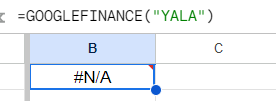 #N/A error that often occurs when using Google Finance function
Clearly, it is a stock listed on the NYSE, but when you search it in the search bar, no stock information appears.
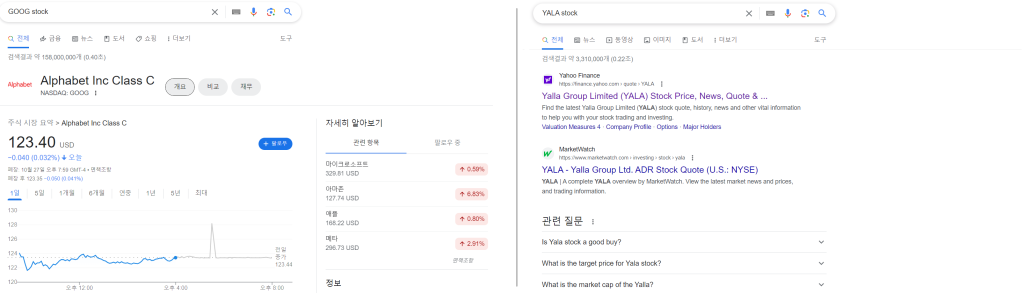 Google (GOOG, left), where stock price information can be checked when searching for tickers vs. Yala Group (YALA, right), where only search results can be checked
##Solution
In this case, there is a way to import information from Yahoo Finance into Google Sheets.
Of course, there is a way to import Yahoo Finance information using importhtml, but The downside is that the code becomes unnecessarily long, visibility is low, and maintenance is cumbersome.
App script. You can just use coding. In fact, it is coding, and users just need to copy and paste the image below.
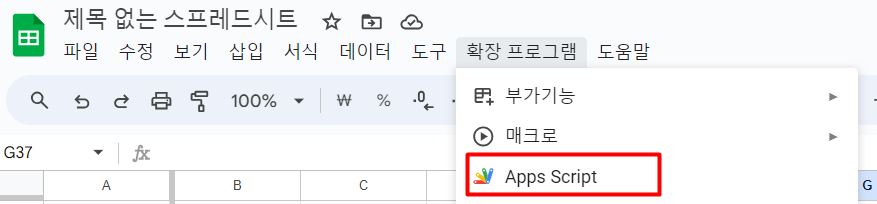
Enter the Apps Script screen as shown above,
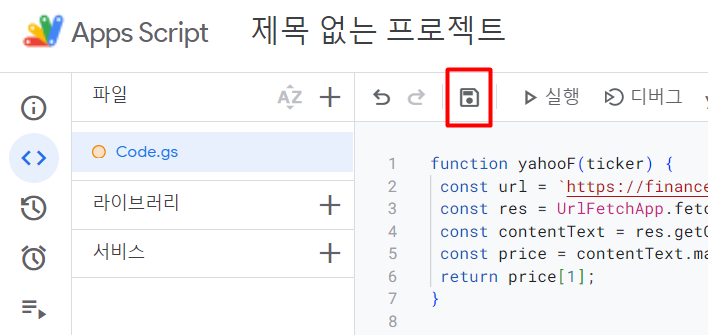
In the empty window labeled Code.gs, paste the code below. After that, don't worry about anything else (distributing new files, etc.), just click theSave button and close the window.
function yahooF(ticker) { const url = https://finance.yahoo.com/quote/${ticker}?p=${ticker}; const res = UrlFetchApp.fetch(url, {muteHttpExceptions: true}); const contentText = res.getContentText(); const price = contentText.match(/<fin-streamer(?:.*?)active="">(\d+[,]?[\d\.]+?)<\/fin-streamer>/); console.log(price[1]); return price[1]; }
Just add the above content to the app script. For reference, the yahooF part after the first function is the name of the function that will be used in the future. It operates normally even if you modify it as desired, such as YAHOOFINANCE, YF, etc. according to your convenience.
= IFERROR(GOOGLEFINANCE(ticker), yahooF(**ticker**))
When an error occurs in Google Finance. Look up Yahoo Finance. In this way, an unrivaled combination of functions was born.
The code above referred to that link. (Link)